What this app is
Common Story keeps track of contributions inside a group of people who know each other — a neighbourhood, a club, a village, a field where you play airsoft on Saturdays.
It works on a simple idea called mutual credit. You don't need to have anything saved up before you can receive something. When Ana bakes bread for you, your balance goes down and hers goes up by the same amount. Nothing was created and nothing was taken from anywhere else — the two of you simply recorded that you now owe the group a contribution, and Ana has made one.
Because every payment moves the same amount in both directions, the whole community always adds up to zero. Some people are above the line, some below, and both are normal. Being below the line just means you have received before you have given.
There is no company running this. Your records live on your own phone. Nothing is uploaded, there is no account to register, no email address, no fees, and no server that could be switched off. Two phones exchange records directly, face to face or through a link you send.
Your secret phrase
This is the most important page in the manual.
Your wallet is created from a single secret phrase that you choose. There is no username and no password reset, because there is nobody to reset it. The phrase is your wallet.
Write your phrase down on paper today. If you forget it, nobody — not the community, not the people who made this app — can recover your wallet. If somebody else learns it, they hold your wallet exactly as you do.
Choosing a good phrase
- Use several words, not one. The app asks for at least three words and twelve characters.
- Pick something you will still remember in a year — a line from a song, a memory, a sentence about your grandmother's garden.
- Don't use a single common word. If two people both chose
libertate, they would end up sharing one wallet. - Write it exactly as you typed it, including spaces, and keep the paper somewhere safe at home.
The good news: the same phrase always rebuilds the same wallets. Lose your phone, buy a new one, type the phrase, and your identity comes back — no account recovery, no waiting.
Creating your wallet
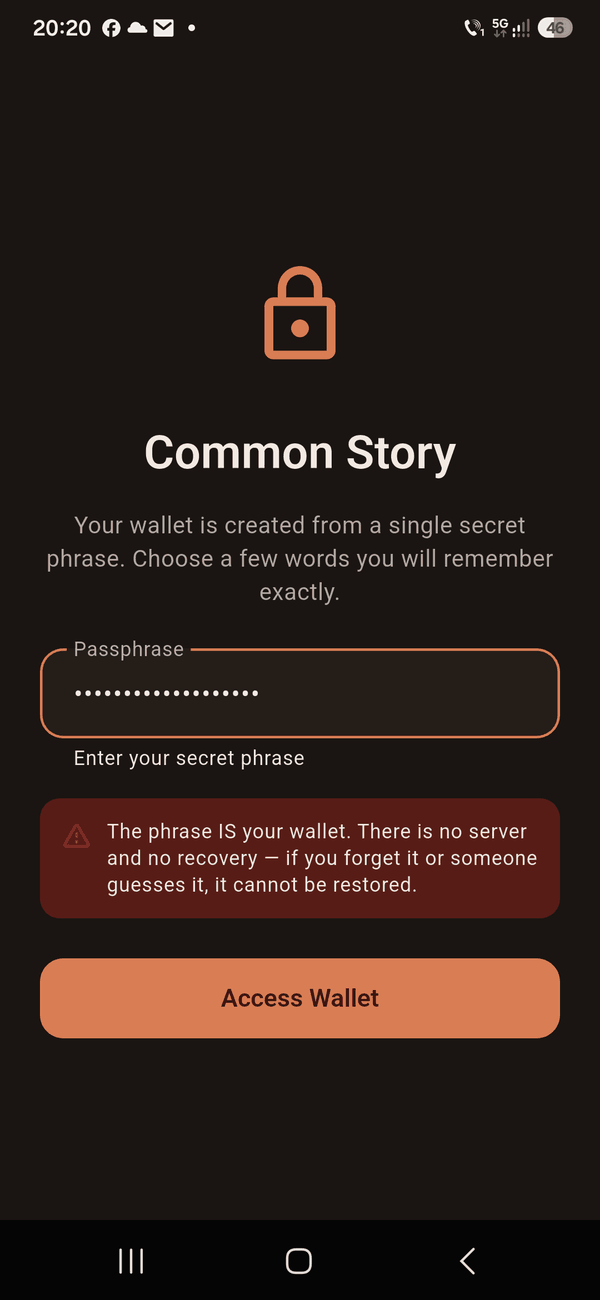
The opening screen One field, and a warning that the phrase cannot be recovered.
Open the app
You will see a single field asking for your phrase. There is nothing else to fill in — no name, no email, no phone number. The app never asks who you are.
Type your phrase
Type the phrase you chose and wrote down. If it is too short or only one word, the app will tell you and ask for a longer one.
Tap "Access Wallet"
It takes a second or two. That pause is deliberate — the app is doing slow, careful work to turn your phrase into a key, which is what makes a stolen phrase hard to guess.
That's it. You now have a wallet. The app shows the first characters of your wallet's public name — a long code like 8f3a2c1d…. That code is how other people's phones recognise you. It contains nothing about you personally.
Reading the main screen
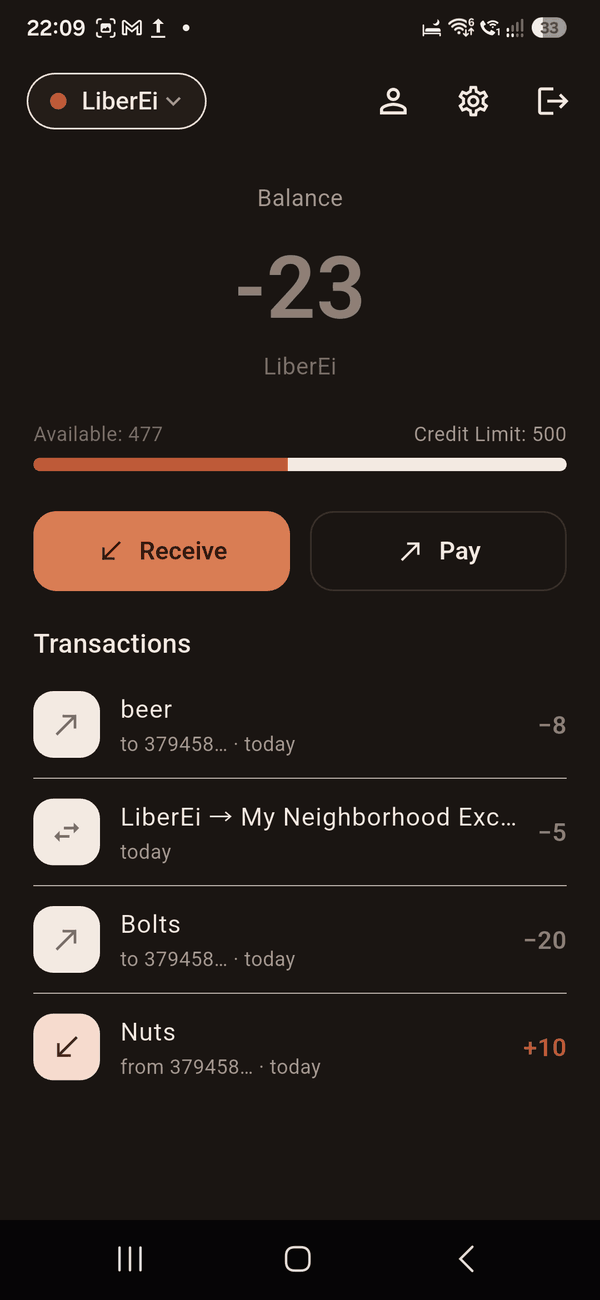
Your wallet Community at the top, balance in the middle, then what you can still spend.
The community button, top left
The rounded button at the top shows which community you are currently in. Tap it to switch between communities, invite someone, join a new one, or start your own.
Your balance, in the middle
The large number is what you hold, shown in whatever the community calls its units — Photons, ASRei, LiberEi, whatever was chosen. A number above zero means you have contributed more than you have received so far. Below zero means the opposite, and it is shown in a calm grey rather than alarming red, because it is not a problem.
The bar underneath
This shows how much you can still spend before reaching your limit — the app calls it Available. To its right is your current limit. Both are explained in how your limit grows.
Receive and Pay
The two main buttons. Receive is for when somebody is giving you something; Pay opens the camera to scan.
The two icons, top right
| Icon | What it opens |
|---|---|
| Gear | Settings — backups, removing communities, erasing data |
| Arrow | Sign out. Your phrase brings everything back. |
Starting a community
A community is a group of people who trade with each other and trust each other enough to keep a shared record. It has a name, and it decides what to call its own units.
These are two separate things, and the difference matters. The community is the group — "Airsoft Romania". The unit name is only the word on the amounts — "ASRei". Every community picks both for itself.
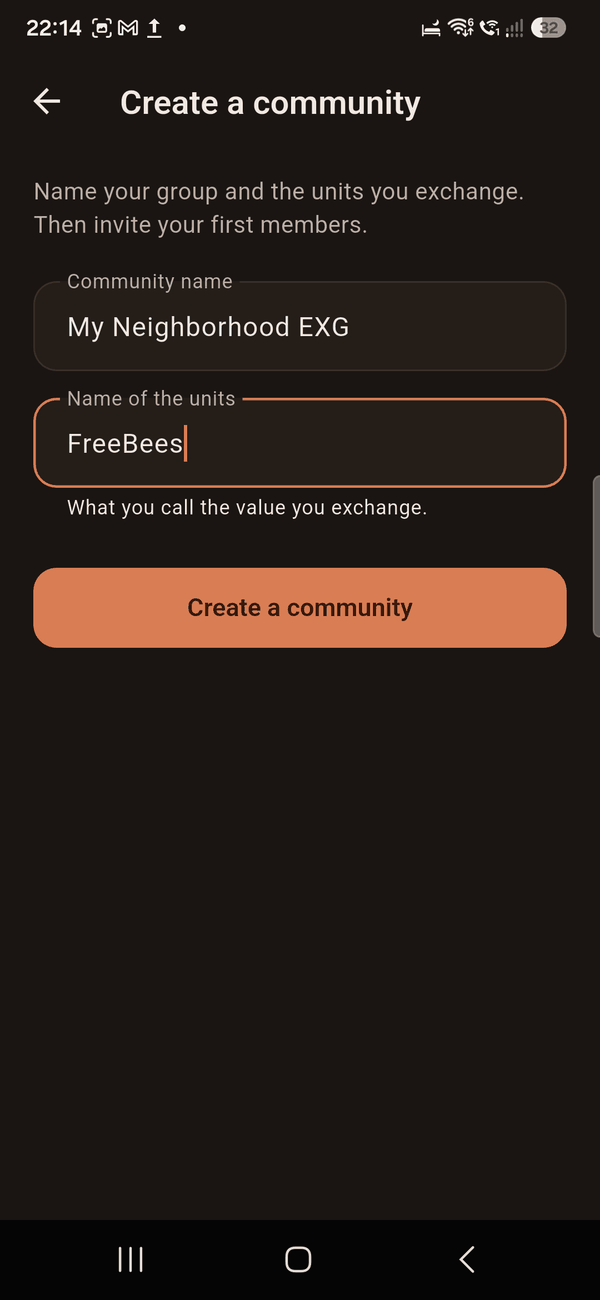
Founding a group Name the group, then name what you will call a unit of contribution.
Tap the community button, then "Create a community"
Name the group
Use the name people would actually say out loud — "Făurei Exchange Community", "Airsoft players at Băneasa". Everyone who joins must end up with exactly this name, which is why invitations exist rather than asking people to type it.
Name the units
Whatever the group wants to call a unit of contribution. If you leave it empty, the community's own name is used.
Tap "Create a community"
Your wallet for the new community is created immediately and becomes the active one. Now invite people.
Inviting people
New members are brought in by existing members. This does two useful things: it passes the community's exact name and unit name across without anyone mistyping them, and it leaves a record of who vouched for whom.
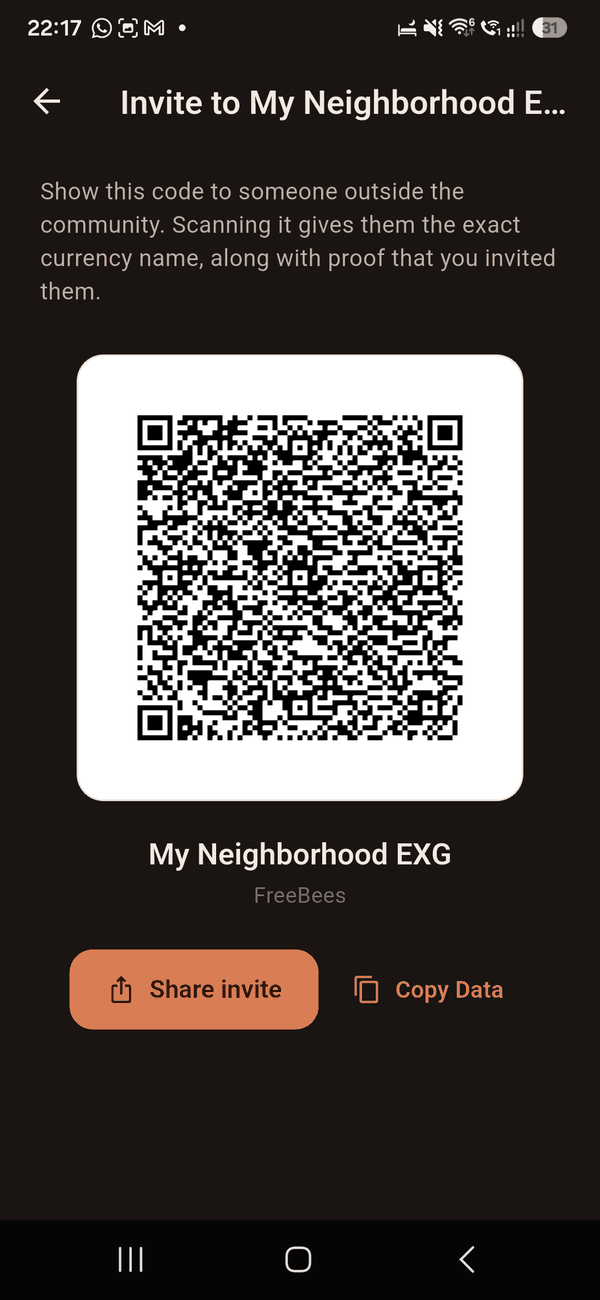
An invitation Show the code in person, or send it through any messaging app.
Community button → "Invite to …"
A code appears. It carries the community name, the unit name, your wallet code, and a signature that proves the invitation really came from you.
Show it, or send it
In person, let them scan it from your screen. At a distance, tap Share invite and send it through whatever messaging app you both use.
An invitation is a record, not a lock. Because there is no central server, the app cannot physically stop somebody from creating a wallet in a community they weren't invited to. What it can do is prove who invited whom. If somebody appears without an invitation, members are free to simply not trade with them — which is how trust works among people anyway.
Joining a community
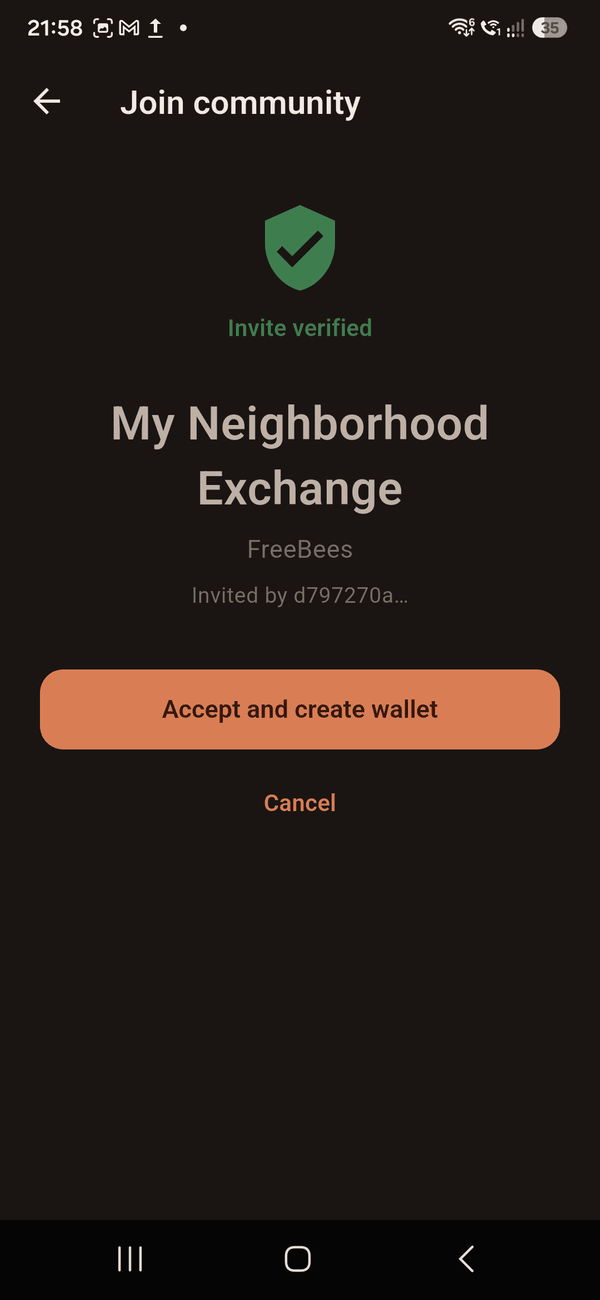
Accepting The green badge means the invitation's signature checked out.
Tap the link, or scan the code
If somebody sent the invitation as a link, tapping it opens the app straight to this screen. In person, use the community button → Join with an invite, which opens the camera.
Check what you are joining
You will see the community's name, what it calls its units, and who invited you.
Check the badge, then accept
A green Invite verified badge means the signature checked out. If it says the invitation could not be verified, the button stays disabled — the code was damaged or altered, and you should ask for a fresh one.
If a link doesn't open the app, copy it, open Common Story, and use Join with an invite to scan instead — or paste the link using the keyboard icon on the scanning screen.
Paying and getting paid
Every exchange has two sides, and both phones do something. Here they are next to each other.
The person receiving
1. Tap Receive.
2. Enter the amount and a short description — "bread", "two hours of help in the garden".
3. Tap Generate QR code. The form folds away and the code appears.
4. Show the code, or tap Share request to send it as a link.
The person paying
1. Tap Pay and scan the code — or simply tap the link they sent you.
2. Check the amount and description on the confirmation screen.
3. Tap Pay. Your phone signs the payment.
4. A proof code appears. Show it back to them.
To finish, the person receiving taps Scan buyer's proof — the button at the bottom of the Receive screen — and scans the code from the payer's phone. Their phone checks the signature, shows a green Signature valid badge, and only then offers Confirm. Both phones now hold a matching, signed record.
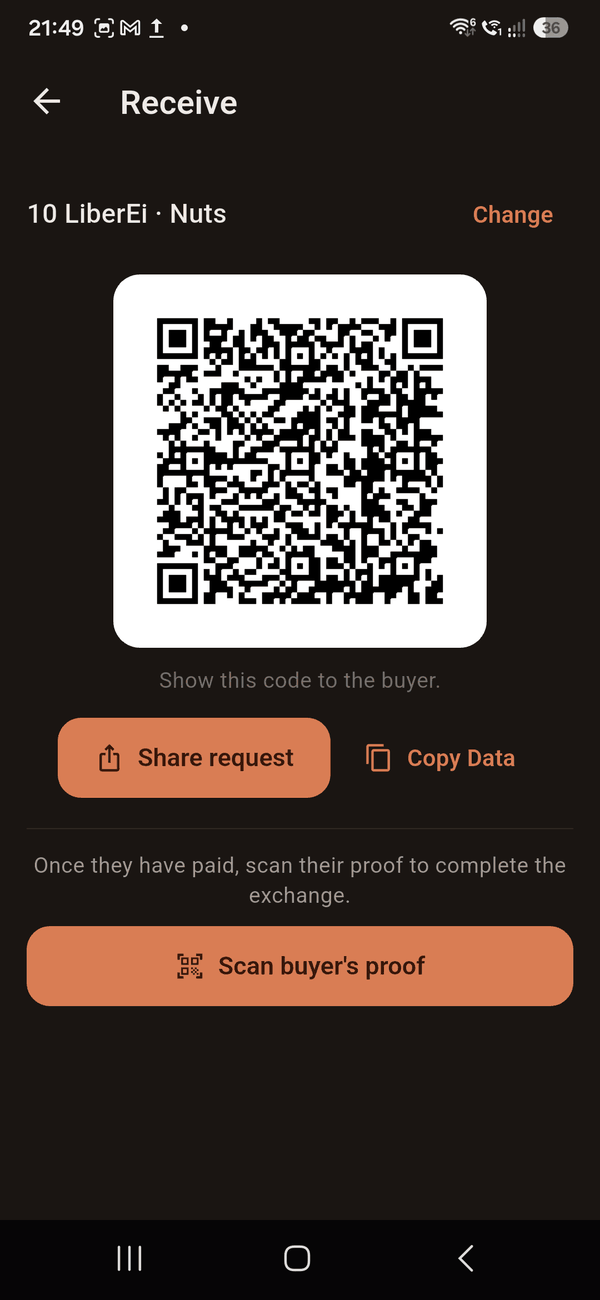
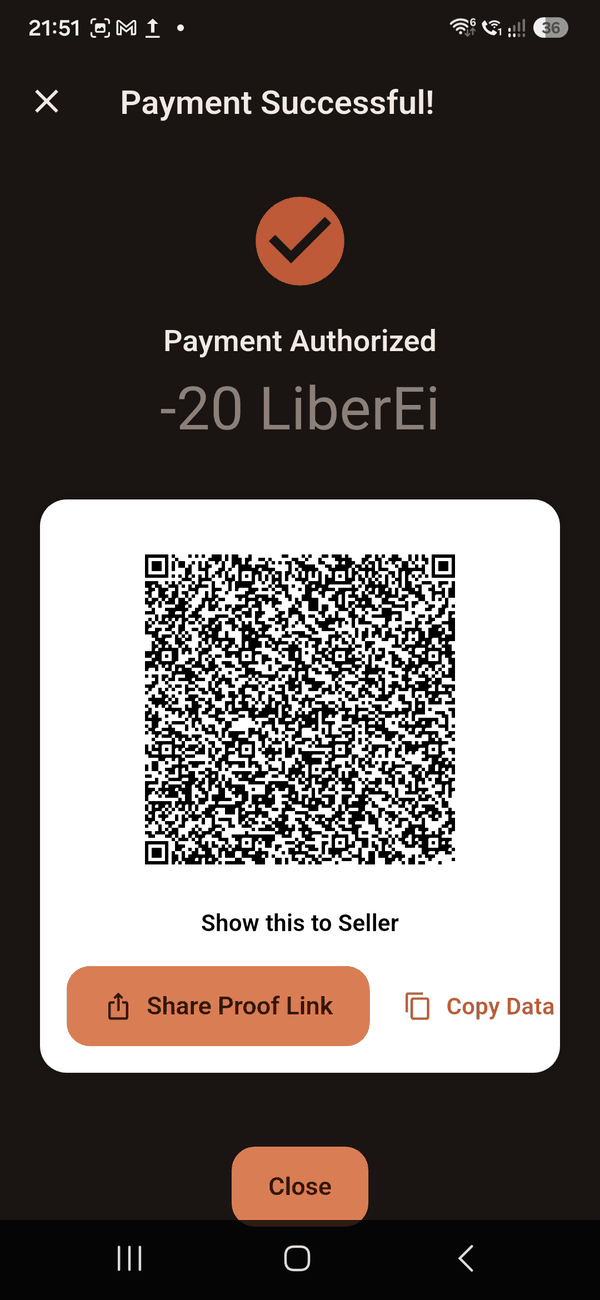
Both halves Left: the request, with the closing step at the bottom. Right: the proof the payer shows back.
None of this needs internet. Two phones in a field with no signal can complete a payment. The codes carry everything required, and the signatures are made and checked on the phones themselves.
Paying somebody far away
Use the same steps, but send the codes as links instead of showing them. Tap Share request or Share proof and pick any messaging app. The other person taps the link and the app opens with the details already filled in.
How your limit grows
You can go below zero — that's the whole point — but not indefinitely. Everybody starts with a limit of 500, and it grows as you contribute to others.
What raises your limit is being paid by different people. Each individual person can only count for 250 towards your limit, no matter how much you trade with them.
| Contribution counted | Your limit | Roughly means |
|---|---|---|
| 0 – 500 | −500 | Everyone starts here |
| 501 – 1,000 | −1,000 | At least three different people have paid you |
| 1,001 – 1,500 | −1,500 | At least five |
| … | … | and so on — another 500 of limit for every 500 counted |
| 4,501 and above | −5,000 | The highest limit there is |
Why it works this way
If a limit rose simply because two friends passed the same amount back and forth, anyone could inflate their own limit in an afternoon. Capping how much any single person can count for means growth has to come from genuinely contributing to several people. It also means a newcomer's first increase requires three real trading partners — deliberately, so trust is built with the group rather than with one accomplice.
The limit is a guide, not a gate. Because every phone keeps its own records and they only meet when they sync, it is possible to go past a limit by paying two people who haven't spoken to each other. The signed records make that visible afterwards — but the app cannot physically prevent it. This is a community that runs on trust, with proof to fall back on, not on enforcement.
Several wallets at once
You can belong to as many communities as you like. Each has its own wallet, its own balance, and its own limit, and all of them come from the same secret phrase — one thing to remember, however many groups you join.
Switch between them with the community button at the top.
Moving value between your own wallets
If you have more than one wallet, a Move between wallets link appears under the main buttons. Contribution is contribution, so it moves one-for-one with no fee and no exchange rate: a child who earned units in a school community can carry them into the village one.
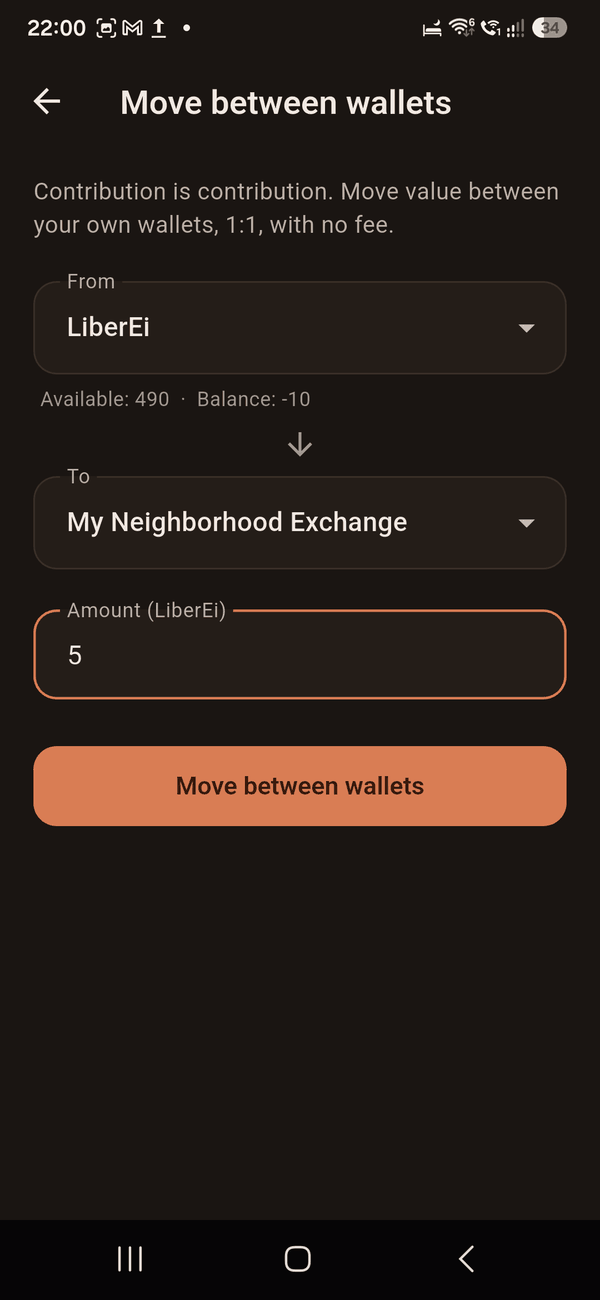
Between your own wallets Pick where it comes from, where it goes, and how much.
The amount leaves one wallet and arrives in the other exactly — nothing is created, nothing is lost.
One thing that surprises people. Value you moved in from another community does not raise your limit here. Spending it works normally, but limits are earned by contributing to people in this community — otherwise units that are easy to earn in one community could be accumulated artificially and carried into one where they are harder to earn.
Backups
The app quietly saves a copy of your history on your phone whenever something changes. You never have to remember to do it.
Everything in that copy is encrypted with your secret phrase, so it is safe to keep in your email or cloud storage. Anyone opening the file without your phrase sees nothing readable.
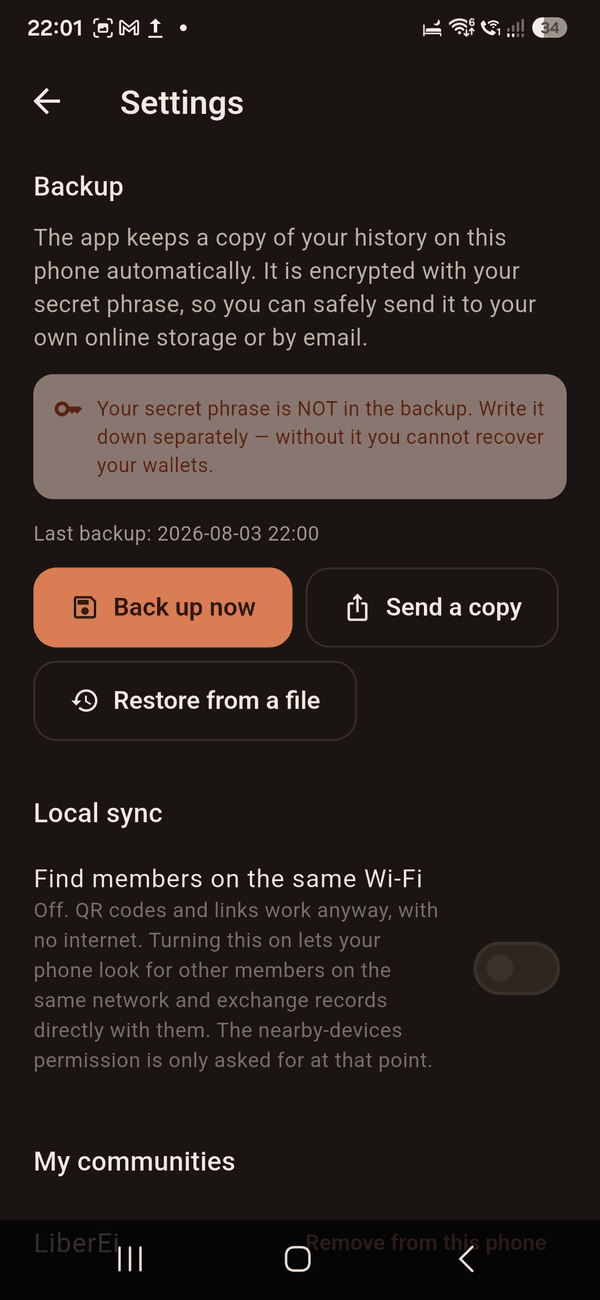
Settings Back up, send a copy elsewhere, restore, or remove things.
Keeping a copy somewhere else
Gear icon → Send a copy. Pick your cloud storage, your email, wherever you like. Do this occasionally, and certainly before changing phones.
Getting your history back
On the new phone, sign in with the same secret phrase. Your wallets and identity return immediately — they were never stored anywhere, they are rebuilt from the phrase.
Gear icon → Restore from a file, and choose the backup you saved.
Your history reappears. Anything the app cannot verify is refused rather than trusted, so a damaged or edited file can never quietly add things that didn't happen.
Your phrase is not inside the backup. That is on purpose — a file you keep in the cloud is the worst possible place for it. The backup restores what happened; only your phrase restores who you are. Keep the written phrase separately, and you can survive losing anything else.
Removing and erasing
Everything on your phone is yours to remove. Under the gear icon you can take a community off this phone, optionally along with its history, or erase everything and start again.
What removing does
Takes the community off this phone so it stops cluttering your list.
Your wallet is not destroyed. It is built from your phrase, so joining again recreates exactly the same one, with the same code.
What it doesn't do
It does not cancel anything. The people you traded with still hold their own signed records.
If you later sync with them, those records come back — correctly. You deleted your copy, not what happened.
What it doesn't do
Worth knowing plainly, so nothing comes as a surprise.
- No money. Units are not lei, euros or anything convertible. There is no way to buy in or cash out, by design.
- No recovery. Forget your phrase and the wallet is gone. Nobody can help.
- No enforcement. Nothing collects a debt or blocks anyone. The app records and proves; people decide.
- No automatic finding of nearby phones on older Androids. Phones on the same Wi-Fi can find each other on Android 13 and newer. Everywhere else, codes and links do the job — and those work with no internet at all.
- No accounts, no tracking, no adverts. The app never asks who you are or where you are, and nothing about you leaves your phone unless you send it yourself.
About the links. A payment or invitation link points at commonstory.app so phones recognise it, but the details ride in the part of the address after the # — which browsers never send to a server. If somebody without the app taps your link, the website learns nothing about the payment. Bear in mind that whichever messaging app you send it through can still see the message, as with anything you send.
If something goes wrong
- I scanned an invitation and it says it can't be verified
- The code was altered or damaged in transit. Ask the person to open the invitation screen again and send you a fresh one.
- My balance looks wrong after trading
- Your phone may not have received the other half yet. Normally the person receiving scans your proof code. If that was missed, and both phones are on the same Wi‑Fi with local sync switched on, it will arrive on its own within a few seconds. Pull down on the wallet screen to refresh.
- I typed the community name myself and now I'm alone in it
- Almost certainly a spelling difference — "Free Me" and "FreeMe" are two separate communities. Remove it under the gear icon and join properly with an invitation, which carries the exact name.
- A link doesn't open the app
- Tapping it should be enough. If a chat app has shortened or broken the link, copy the whole text instead, open Common Story, go to Pay, and use the keyboard icon at the top to paste it in.
- I got a new phone
- Install the app, sign in with the same phrase, then restore your backup file. See backups.
- I forgot my phrase
- There is genuinely nothing that can be done — this is the cost of having no company holding your data. Your trading partners still hold their records of what happened between you, so the community's memory survives even if your wallet does not.